Full course · Life + P&C · build it as you watch
The Facebook Ads Lead Gen Course for Insurance Agents.
8
checkpoints. Don't skip one.
1
number to judge it all on: cost per policy
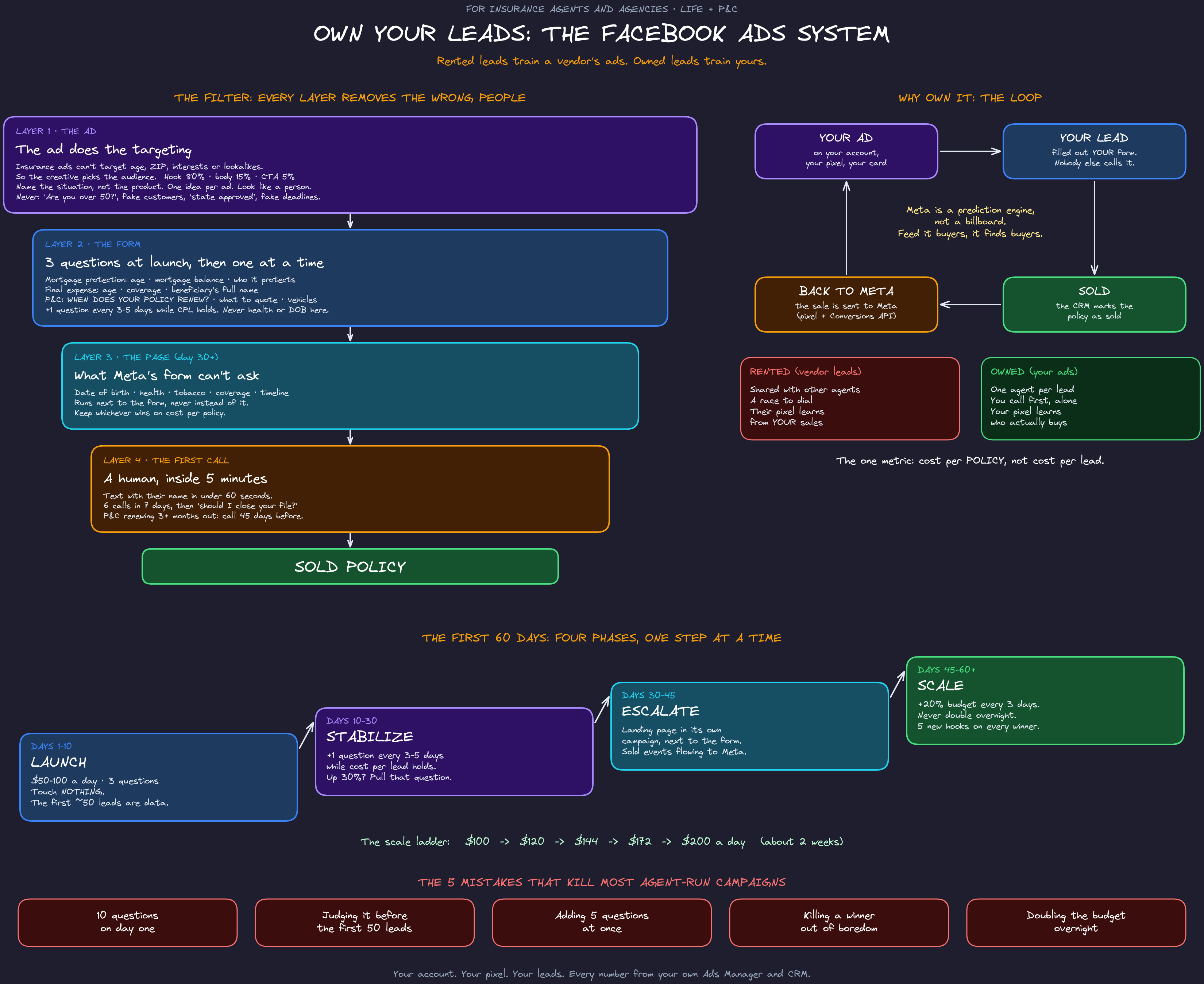
The whole system on one page
The course map
8 modules. Build each one before the next.
0Mindset
8 beliefs, and the proof
1Start here
Your target cost per policy
2Foundations
Accounts, company page, pixel
3The ads
AI presenter video ads
4The form
3 questions, then up to 8
5The campaign
One line, built click by click
6Speed to lead
GHL: dial every lead in 5 minutes
7Optimize + scale
Your 60-day plan
0
Mindset.
- 0.1 8 beliefs that keep agents buying leads
- 0.2 The proof: our case studies
0.1 · 8 beliefs, all wrong
What agents believe. What's true.
"Facebook leads are junk"Junk comes from a weak form and slow calls
630 leads, about 135 policies, 90 days.
"I'm not techy"It's a checklist, not a talent
Every click on screen, 7 Claude skills to help.
"You need a big budget"$50-100 a day is enough to start
10 policies a month: about $600-700 in ads.
"I tried ads and lost money"You ran ads, not a system
Ad + form + 5-minute call + follow-up.
0.1 · 8 beliefs, all wrong
What agents believe. What's true.
"Bought leads are cheaper"Bought leads are rented
Shared with other agents. Gone when you stop paying.
"Old leads are dead"They just never got followed up
316 appointments from 90+ day old leads.
"I have to be on camera"A company page and AI presenters
The lead answers the offer, not your face.
"AI ads look fake"They're already running
See the swipe file. Never a fake customer.
0.2 · This exact system · one agency · 90 days
$60K to $86K a month in commissions.
$9K
in ads, from its own ad account
Mortgage protection: $11 leads, 18% bought. Home + auto: $17 leads, 24% bought. One agency's result, not a promise.
0.2 · Two more agents on this system
Same system. Different agents.
19-year-old life agent · 60 days$18K to $29K a month
Kicked out of his home, dialing shared and aged leads. Now exclusive Meta leads at $12-17 each.
21-year-old P&C agent3 policies a day
Home and auto leads from his own ads, called within minutes.
0.2 · More systems we built for insurance agencies
Follow-up and automation, measured.
Final expense AI dialer316 appointments
15,400 AI calls to 90+ day old leads, in 27 calling days.
Specter Insurance$1.08M new premium
12 months, 30-40 referral partners, zero bought leads.
AI voice agent$93,526 a year saved
For one agency.
Back-office automation$85,327 saved
Back-office work done by AI.
AI recruiting system250 hours a month
And $60K a year saved.
Full write-upsinsperaai.com
/case-studies
Checkpoint · Module 0
Which belief was holding you back?
- Name it, and what replaces it
- You've seen the numbers: one agency's result, not a promise
1
Start here.
- 1.1 Who this is for
- 1.2 Rented vs owned leads
- 1.3 The one number: cost per policy
Module 1 · open this next to the video
Follow along in the Module 1 SOP.
What's in itStart here
Who it's for, rented vs owned leads, and your target cost per policy.
How to use itPause, do the step, come back
Every click path, every copy-paste block, by line: mortgage protection, final expense, term/IUL, Medicare, P&C.
fb-ads-course-sops-p219k.vercel.app
1.1 · Who this is for
This works if all four are true.
1You're licensed
In every state you'll run ads in. The ads only show there.
2Someone dials in 5 minutes
You or a team member, every time a lead comes in.
3You fund the ads
$50-100 a day to start, on your own card.
4You give it 60 days
Month one is calibration. Judging it on day 3 kills it.
Ads amplify a follow-up system that works. They can't fix one that doesn't.
1.2 · Rented vs owned
Rented leads train a vendor's ads. Owned leads train yours.
Rented (bought leads)
- Often sold to several agents at once
- A race to dial the same person
- Your sales teach the vendor's pixel who buys
- Stop paying, the leads stop
Owned (your ad account)
- The lead filled out YOUR form
- You're the only one calling
- Your sales teach YOUR pixel who buys
- The account, the data, the audience stay yours
1.3 · The one number
Cost per lead lies. Cost per policy doesn't.
Ad spend ÷ cost per lead = leads
Leads × close rate = policies
Ad spend ÷ policies = COST PER POLICY
One agency · mortgage protection$11 lead × 18% closed
≈ $61
of ads per policy
Same agency · home + auto$17 lead × 24% closed
≈ $71
of ads per policy
The "expensive" lead cost $6 more and only $10 more per policy. Real client, unnamed, 90 days.
Checkpoint · Module 1
Write down your target cost per policy.
- All four fit checks pass. One line picked to start, not three
- Your average first-year commission per policy for that line
- The most you'd happily spend in ads to write one: every decision gets judged against it
2
Foundations.
- 2.1 Your portfolio + ad account
- 2.2 The page leads click through to
- 2.3 Pixel + Conversions API
- 2.4 The insurance ad category
- 2.5 What gets accounts banned
Module 2 · open this next to the video
Follow along in the Module 2 SOP.
What's in itFoundations
Portfolio, ad account, page, privacy policy, dataset + Conversions API, the insurance ad category, what gets accounts banned.
How to use itPause, do the step, come back
Every click path, every copy-paste block, by line: mortgage protection, final expense, term/IUL, Medicare, P&C.
fb-ads-course-sops-p219k.vercel.app
2.1 · Your portfolio + ad account
Everything in your name. Nothing rented.
- Business portfolio named your legal business name
- Ad account inside it, same name, your card and a backup card
- Business info entered last (entering it early can trigger a restriction)
- A backup admin, two-factor on. Old users and partners removed
- Anyone helping you gets Partner access, never your login
2.2 · The page
A company page, not a personal brand. Plain, real, licensed.
Brand name + logo
A neutral financial name, not your own. A clean logo and cover. No face.
About
What you help with, license number, phone, email.
Never imply an affiliation
No "Veterans", "Medicare", "Federal" or "State" in the name unless it's true.
6-8 real posts
Specific answers, never "Happy Monday". 3 on day one, the rest that week.
Reviews tab
Off, unless you already have real reviews.
Privacy + terms
Two pages on your website. No instant form without the privacy link.
2.2 · Build it now · the brand
Name it like a lead vendor would. Then a clean logo.
Step 1 · 10 minThe name
A plain financial name that fits the line, not your own name.
FormulasFill in the blank
"[Word] Family Benefits" · "[Word] Life Solutions" · "[City] Home and Auto Quotes"
NeverImply a tie you don't have
No Veterans, VA, Medicare, Federal, State, Official, or a union's name.
Step 2 · 15 minThe logo
Just the name, clean. Canva or an AI image tool.
Step 2The cover
A simple brand graphic or a local scene. No face, no stock-photo family.
Step 3 · 5 minThe About section
What you help with, license number, phone, email, website.
P&C agency with a name already? Use it. Medicare: check your FMO's and carriers' rules first. Copy-ready About text by line is in the Module 2 SOP.
2.2 · Build it now · privacy policy + terms · 20 min
Two pages on your website. Meta won't run an instant form without them.
- Privacy policy at yourdomain.com/privacy-policy
- Terms at yourdomain.com/terms
- Say what you collect, how you contact people (call, text, email) and how to opt out
- Have a compliance contact or attorney check them
- The privacy link goes on every instant form (Module 4)
2.3 · Pixel + Conversions API
The pixel's job: teach Meta who buys.
In the browserPixel events
PageView on every page · Lead on submit · Schedule on a booking. Exact casing. Allow-list only your domain.
From GHLConversions API
Lead → every stage change (Contacted, Quoted, Sold). One event per pipeline stage.
Match quality6+ is fine, 8+ is the goal
Send hashed email, phone, name, ZIP and Meta's lead ID.
NeverHealth or date of birth
Event name, hashed identifiers and value only. Nothing sensitive.
Under ~50 conversions a week? Wire it and let it collect. Don't over-engineer it yet.
2.4 · The insurance ad category
Every insurance campaign runs under "Financial products and services."
What it takes away
- Age targeting
- Gender targeting
- ZIP code targeting
- Lookalike audiences
What you still control
- The states you're licensed in
- The ad itself
- The form
- How fast you call
Mandatory for US insurance ads since January 2025. So the creative is the targeting. That's module 3.
2.5 · What gets accounts banned
Four ways agents lose their ad account.
- Running ads from a backup account after one gets disabled. That's circumvention: it can take the whole portfolio down. Request a review from Account Quality instead.
- Entering business info first, before the account has history
- Duplicate pages and ad accounts left lying around
- Ads that imply someone's age, health or money problems (lesson 3.6)
Build it now · in Meta Business Suite
Your portfolio, page and ad account. 30 minutes.
- business.facebook.com → create the portfolio. Your legal name, exactly as licensed
- Settings → People: add a backup admin. Turn on two-factor
- Settings → Accounts → Pages + Instagram: add yours
- Ad accounts → Add → Create new. Pick your time zone and USD carefully: they never change
- Billing: a card, a backup card, a spending limit
- Brand safety → Domains: verify yours with a DNS TXT record
- Business info goes in last
Build it now · in Events Manager
The dataset: how Meta learns who buys.
- Events Manager → Connect data → Web → name it "[Agency] Dataset"
- Paste the dataset ID into your website builder or GHL
- Events: PageView, Lead, Schedule. Exact capitals
- Settings → traffic permissions: only your domain
- Test events tab: watch PageView fire
- Conversions API: generate the token, paste it straight into GHL's Conversions API action. Never in a chat
Form submitted → Lead · Every stage change → its name · Sold → Purchase, if GHL offers it
Checkpoint · Module 2
Accounts live, clean, and yours.
- Portfolio + ad account in your legal business name, card + backup card, two-factor on
- Company page: brand name, logo, About with license number, phone and email, 6-8 real posts
- Domain verified. Pixel installed, your domain allow-listed, test events showing
3
The ads.
- 3.1 Creative is the targeting
- 3.2 Hook 80 · body 15 · CTA 5
- 3.3 Hooks by line
- 3.4 Formats and the launch set
- 3.5 Swipe file teardown
- 3.6 What you can and can't say
Module 3 · open this next to the video
Follow along in the Module 3 SOP.
What's in itThe ads
Hooks by line, the launch set of 3 video ads, AI presenter video prompts, statics for inspiration, copy-ready primary text and headlines, the say / never-say table.
How to use itPause, do the step, come back
Every click path, every copy-paste block, by line: mortgage protection, final expense, term/IUL, Medicare, P&C.
fb-ads-course-sops-p219k.vercel.app
3.1 · Creative is the targeting
Who the ad speaks to is who shows up.
Same offer"…for police officers"
Pulls police officers.
Same offer"…for pharmacists"
Pulls pharmacists.
Same offer"…for carpenters"
Pulls carpenters.
You can't pick the audience in the settings anymore. You pick it in the first line of the ad.
Examples from public ads other agents run (lesson 3.5). Not ours.
3.2 · The three jobs of an ad
Hook 80 · body 15 · CTA 5.
80%
The hook
First 3 seconds. Decides who stays, and does the first round of qualifying.
15%
The body
Belief. One idea. Handles the objection before they think it.
5%
The CTA
Exactly what happens after the tap. Stop rewriting it.
Results dropped? Rewrite the hook. Not the CTA, not the targeting.
3.3 · Hooks that work
Name the situation, not the product.
Weak
- "Affordable life insurance"
- "Get a free home insurance quote"
- Opening on you or your agency
- Teaching before they're hooked
Strong
- "Twenty years left on the mortgage and nothing in place for it"
- "Home insurance renewing in the next 60 days? Get a second quote first."
- Mortgage protection for homeowners · Final expense coverage for adults 50-85
- One idea per ad. If you can't say it in one sentence, cut it
- Look like a person, not an ad
3.4 · Formats and the launch set
The goal is video ads. Launch with 3, one idea each.
What you buildAI presenter video ads
Never you on camera. A presenter who looks like your buyer: a veteran for veterans, a nurse for nurses.
Inspiration onlyImage ads
The course's statics show what's possible with images. Use them to spark ideas for your videos.
Every adJudge on cost per policy
Not cost per lead. A cheap lead that never buys is the expensive one.
"Tap below and answer a few quick questions, so we know you're really looking for coverage. If it's a fit, you'll be talking to us today or tomorrow."
3.5 · Swipe file teardown
21 insurance ads running right now. Steal the structure, not the words.
- Who does the first line call out?
- What's the one idea?
- Does it look like a person or an ad?
- Does the CTA say exactly what happens next?
Real ads, running nowThe swipe file
insurance-ad-swipe-file.vercel.app
Public Meta Ad Library ads. Not our clients.
Built for this courseThe Ad Library
fb-ads-course-sops-p219k.vercel.app/ad-library
25 statics across 5 lines + 6 video ads, with the exact prompts that made them.
3.6 · What you can and can't say
Your license is on every ad. True isn't always enough.
| The line | The rule | Say instead |
|---|
| "Are you over 50?" · "If you're diabetic…" | Never. Meta rejects ads that imply age, health or money problems | "Final expense coverage for adults 50-85" |
| AI "customers", fake testimonials | Never. The FTC rule on fake reviews covers AI ones | A real client who gave written consent. Made-up: "AI-generated portrayal. Sample scenario." |
| "State approved" · "federally backed" | Only when it's literally true of the product, like NFIP flood insurance. A policy form filed with your state is not "state approved": state ad rules ban implying a government tie | Your agency name, licensed agent |
| Your own product name ("Home Shield Plan") | OK if the ad also says what it really is and who offers it. Never a "program" that sounds like a lender or the government | "Home Shield Plan: mortgage protection life insurance from Harbor Family Benefits" |
| Fake deadlines, "enrollment closes this month" | Only a real deadline (Medicare's enrollment periods are real) | "Health and age only move one way" |
| "You're pre-approved" · "You qualify" | Never in the ad (Meta: it claims to know their situation). After the form, only when true: a guaranteed-issue plan in their age range, or the carrier said yes | Ad: "See what you qualify for." After: "You're in the age range for a guaranteed-issue plan" |
3.6 · What you CAN put on your ads
Plenty works. Call out the situation, not the person.
Call outThe situation or the job
"Just bought a home?" · "Electricians:" · "2 cars + a house?"
NameWho the product is for
"Final expense coverage for adults 50-85." The product's range, not their age.
AskThe question in their head
"If one of us dies, can the other one still pay the mortgage?"
ShowReal results, with consent
A real client's numbers, with written consent. A made-up scenario says "AI-generated portrayal. Sample scenario."
SayWho you are and what happens next
Your agency name. "A licensed agent calls you." "See what you qualify for."
Only if trueFeatures and dates
Living benefits, no exam, level premium: only what your carriers offer. Deadlines only when real, like Medicare's enrollment periods.
Walkthrough · show it on screen · insurance-ad-swipe-file.vercel.app
The swipe file: real insurance ads running right now.
- Open 3 ads from different lines. For each, ask the 4 teardown questions
- Point out the presenter: someone who looks like the buyer (the veteran, the tradesman)
- Point out the setting: a job site, a garage, a podcast set. The setting does the targeting
- Point out what not to copy: "guaranteed approval", "the VA won't", made-up programs
- For more: American Income Life's live ads, sorted by reach (link on the page)
Walkthrough · show it on screen · the SOP site → Ad Library
The course Ad Library: every ad we made, with the exact prompts.
First · imagesWhat's possible with a static
Open 2-3 statics and their prompts. They're inspiration: the hook on a real object becomes the first line of a video.
Then · the goalOne video ad, start to finish
Open a video ad and walk the 4 steps: the presenter still → the raw clips with their prompts → the clips joined → the edited ad.
Copy the structure, change every detail so it's yours. The skills on the Skills page build each step with you.
Checkpoint · Module 3
3 video ads, ready to load.
- One idea each. The first line calls out a specific situation
- An AI presenter who looks like your buyer. Captions and any disclaimer on
- Every word passes lesson 3.6, and the CTA says what happens next
4
The form.
- 4.1 Instant form settings
- 4.2 3 launch questions by line
- 4.3 P&C: the renewal question
- 4.4 Consent, phone code, thank-you
- 4.5 The question ladder
Module 4 · open this next to the video
Follow along in the Module 4 SOP.
What's in itThe form
Instant form settings, 3 launch questions by line, the P&C renewal question, consent + thank-you screens, the question ladder.
How to use itPause, do the step, come back
Every click path, every copy-paste block, by line: mortgage protection, final expense, term/IUL, Medicare, P&C.
fb-ads-course-sops-p219k.vercel.app
4.1 · Instant form settings
Start on volume. Tighten later.
- Form type: More volume (Higher intent only when quality is the problem, or phone verification is only offered there)
- Contact fields: full name, phone, email, ZIP (+ state for life lines)
- Privacy policy link (required) and a consent box
- Intro screen: "This is only for people ready to get coverage in place. Three quick questions, then a licensed agent calls you. Just looking for information? Message us instead."
4.2 · 3 launch questions by line
Three questions. Not ten.
| Line | Q1 | Q2 | Q3 |
|---|
| Mortgage protection | Age range | Mortgage balance range | Who would it protect? |
| Term life | Age range | Coverage amount range | Who is it for? |
| Final expense | Age range (50-85 bands) | Coverage amount | Beneficiary's full name (typed) |
| Home / auto | When does your policy renew? | What do you want quoted? | How many vehicles / own your home? |
Ten questions on day one gets you five leads, and Meta can't learn from five.
4.3 · The P&C question
Life qualifies on insurability. P&C qualifies on timing.
"When does your current policy renew?" · within 30 days · 1-3 months · 3-6 months · 6+ months · not insured right now
Why it matters
Someone 9 months from renewal is a real lead with a later close date. Switching mid-term is awkward. Treat them differently, don't throw them away.
What it does
Routes every lead: quote now, or set an X-date and call 45 days before renewal (lesson 6.5).
4.4 · Consent, phone code, thank-you
Real people only. One agency named.
By submitting, I agree that [Agency Name] and [Agent Name], a licensed insurance agent, may contact me at the number and email I provided by call, text and email, including with automated technology, about insurance. Consent is not required to buy anything. Message and data rates may apply. Reply STOP to opt out. See our Privacy Policy.
Phone code (OTP)On for every line, from day one
Every lead is a real number you can reach.
Thank-you screenTell them what happens next
FE: "A licensed agent is calling you in a few minutes." MP, term, IUL: "Last step: pick a time that works."
4.5 · The question ladder
One question at a time. Only while cost per lead holds.
- Add one question every 3-5 days, only if CPL held over the last 3 days
- CPL jumps 30%+? Pull that question, try another next week
- 3 is the minimum. Up to 8 for the most qualified leads
- Let the phones decide: "leads are broke" → add a budget question. "Too unhealthy" → health goes on the landing page
Never on Meta's form: health, tobacco, date of birth, income, debts. Meta doesn't allow them there.
Build it now · in Meta Business Suite
Build the instant form. Publish only when it's final.
- Business Suite → All tools → Instant forms → Create form
- Name it: MP_3Q_v1_[date]. Type: More volume
- Intro screen: who it's for, what happens next. Never "you qualify"
- Your 3 launch questions. Nothing else on day one
- Contact info: name, phone, email, ZIP (+ state for life). Phone verification on
- Privacy policy link + consent checkbox + thank-you screen
- Preview on your phone. A published form locks, so read every word
For FEX: beneficiary question · For P&C: the renewal-date question. All in the SOP.
Checkpoint · Module 4
Your form, 3 questions, published.
- More volume, contact fields, phone verification on, privacy policy, consent box
- 3 launch questions for your line, nothing sensitive. Every word checked
- Thank-you screen that says what happens next, with the right button
- Your next ladder questions written down, up to 8 total
5
The campaign.
- 5.1 Campaign settings
- 5.2 One campaign per line
- 5.3 Ad sets + the learning phase
- 5.4 Naming + tracking
- 5.5 The test lead
Module 5 · open this next to the video
Follow along in the Module 5 SOP.
What's in itThe campaign
The five settings, one campaign per line, ad sets + geography, naming, the test lead, pre-flight.
How to use itPause, do the step, come back
Every click path, every copy-paste block, by line: mortgage protection, final expense, term/IUL, Medicare, P&C.
fb-ads-course-sops-p219k.vercel.app
5.1 · Campaign settings
Five settings. Don't overthink them.
| Setting | Choose |
|---|
| Objective | Leads |
| Special ad category | Financial products and services |
| Budget | Campaign budget (CBO), $50-100 a day to start. Over $100: per ad set |
| Conversion location | Instant form |
| Placements | Advantage+ (automatic) |
5.2 · One campaign per line
Never mix mortgage protection and auto.
Why
Meta optimizes toward one kind of buyer per campaign. Mix two lines and it finds neither.
Also
One destination per campaign. The landing page gets its own campaign later (lesson 7.3).
5.3 · Ad sets + the learning phase
1-2 ad sets. Broad. Your licensed states.
~50
leads a week an ad set needs to finish learning
14-47
leads a week at $50-100/day and a $15-25 cost per lead
1-2
ad sets at launch. Split it six ways and nothing ever learns
Add a separate test ad set only above ~$150 a day.
5.4 · Naming + tracking
Always know which ad a lead saw.
Campaign [Agency]_[Line]_[Form|LP]_[YYMMDD]
Ad set [Format]_[Angle]_v1
Ad H[hook#]_B[body#]_V[visual#]
- Every lead tagged in GHL with its line and form (plus campaign, ad set and ad, if the mapping lists them)
- Website destinations get UTMs (source, medium, campaign, ad)
5.5 · The test lead
One fake lead, end to end, before a dollar is spent.
- Create it in Meta's Lead Ads Testing Tool. The campaign stays a draft
- It lands in GHL within seconds, every answer in its own field, in New
- The email arrives on the test phone. The instant text only once texting is cleared (lesson 6.6)
- The dialer gets the push alert and a "Call within 5 minutes" task
- Move it to another stage: a test event shows up in Events Manager
Build it now · in Ads Manager
The campaign, built and saved as a draft.
- Ads Manager → Create → Leads (manual)
- Special ad category: Financial products and services, United States
- Advantage campaign budget (CBO) on, $50-100 a day (over $100? budget per ad set)
- Ad set: Instant forms · Maximize leads · Advantage+ placements
- Location: your licensed states (P&C: your metro + 15 miles). Broad, no interests
- Ads: upload the launch set, attach the form, creative enhancements that rewrite text off, named so you know which ad a lead saw
- Leave it as a draft until the test lead passes in Module 6
Checkpoint · Module 5
Campaign ready to publish.
- Leads objective, financial products category, one line, $50-100 a day
- 1-2 ad sets, your states, your 3 video ads loaded and named
- Test lead passed every step (finish the GHL half after Module 6)
6
Speed to lead.
- 6.1 The CRM pipeline
- 6.2 The 60-second text
- 6.3 The 5-minute human dial
- 6.4 6 calls in 7 days + texts
- 6.5 P&C renewal router
- 6.6 TCPA + A2P, done right
Module 6 · open this next to the video
Follow along in the Module 6 SOP.
What's in itSpeed to lead
The GHL build step by step: pipeline, Facebook connection, the 60-second text, the 5-minute dial, 6 calls in 7 days, TCPA + A2P.
How to use itPause, do the step, come back
Every click path, every copy-paste block, by line: mortgage protection, final expense, term/IUL, Medicare, P&C.
fb-ads-course-sops-p219k.vercel.app
6.1 · The CRM pipeline
Eight stages in GHL. Every lead in exactly one.
New
Just came in. The clock is running.
Not reached
Called, no conversation yet.
Contacted
A person talked to them.
Callback set
They asked for a later time.
Quoted
Options in front of them.
Sold
Policy written. Tells Meta who buys.
Future (X-date)
P&C only. Renewal too far out to quote.
Lost
The reason goes in the notes.
Every stage change goes to Meta. Name the stages once, never rename them.
6.2 · The 60-second text
Before you even pick up the phone.
Hi {first_name}, it's {agent_name} with {agency_name}. Got your request about {line}. I'm calling you in the next few minutes from this number. Reply STOP to opt out.
Under 60 seconds, with their name: the email right away, this text once A2P clears. Now your call isn't a stranger.
6.3 · The 5-minute dial
A human dials inside 5 minutes. Every time.
- GHL's LeadConnector app on the dialer's phone, push notifications on. That's the alarm
- Card still in New after 5 minutes? The owner and the backup get a push
- No answer? Call straight back once: a second call within 3 minutes can ring through Do Not Disturb
- Then leave a voicemail and move the card to Not reached
After hours: the email right away, the text when your window opens, the first dial at opening time.
6.4 · 6 calls in 7 days
Most people don't pick up the first time. That's normal, not a no.
| Call | When | Text alongside (after A2P) |
|---|
| 1 | Within 5 minutes (twice) | Instant: "calling you in a few minutes" |
| 2 | +1 hour | |
| 3 | Next morning | Day 1: "bad time? grab a slot here" |
| 4 | Day 2, afternoon | |
| 5 | Day 4 | Day 3: "5 minutes on the phone, today or tomorrow?" |
| 6 | Day 7 | Day 7: "Should I close your file?" |
Then a 14-day nurture. The "close your file" text pulls replies the others don't.
6.5 · P&C renewal router
Every renewal answer is a lead. It just gets routed.
| Renewal answer | Do this | Report as |
|---|
| Within 30 days / not insured | Full 6 calls, quote now | Sales-ready |
| 1-3 months | Call now, quote, set the X-date | Sales-ready |
| 3-6 months | One rapport call, then call 45 days before renewal | Future pipeline |
| 6+ months | One call to get the renewal date, monthly value message, call 45 days before | Future pipeline |
Judge a P&C campaign over 6-12 months, not 30 days. Lots of 6+ month answers? Fix the hook.
6.6 · TCPA + A2P
Fast, and still legal.
Do
- First touch is a human
- Register A2P 10DLC for your own business. Until approved: calls and email only
- Texts 8am-8pm their time
- STOP handled automatically, never texted again
Don't
- Lead with an AI voice: it counts as an artificial voice and needs written consent
- Text an old list that never consented to you
- Share one texting number across businesses
Not legal advice. You own compliance for your license.
Build it now · in a fresh GHL sub-account
GHL, from a blank sub-account.
- New sub-account + business profile. Park any snapshot workflows
- Buy a local number. Add your team with push alerts on
- Settings → Integrations: connect Facebook + your page
- Custom fields for every form answer, then map the form
- Pipeline "Ads": New · Not reached · Contacted · Callback set · Quoted · Sold · Future (X-date) · Lost
- Connect your dataset so stage changes reach Meta
Build it now · in GHL Automation
The workflows that do the work.
- New lead: card in New, push alert, "Call within 5 minutes" task, email (text once A2P clears)
- Speed to lead: the 5-minute alarm, then 6 calls in 7 days. Stops once the card leaves New / Not reached
- Stage changed → the stage goes to Meta, Sold included
- The 14-day nurture for the ones who never pick up
- Callback and Sold: book the callback, then the 30-day, 90-day and annual check-ins
Build it now · end to end
One fake lead, end to end, before a dollar is spent.
- developers.facebook.com/tools/lead-ads-testing → your page → your form → Create lead
- Lead lands in GHL in seconds, every answer in its own field, card in New
- Email (text once A2P clears) hits the test phone
- The dialer's phone buzzes: push alert + "Call within 5 minutes" task
- Move the card to another stage → the test event shows in Events Manager
- Delete the test contact, opportunity and any test booking. Then publish the campaign
Checkpoint · Module 6
Test lead emailed and called inside 5 minutes.
- Pipeline built, every form answer mapped, every stage change sent to Meta
- New-lead email, 5-minute alarm, 6-call schedule live
- A2P submitted (texts off until approved)
7
Optimize + scale.
- 7.1 The 4 phases
- 7.2 Kill / keep / scale
- 7.3 The landing page (day 30+)
- 7.4 Sending sales back to Meta
- 7.5 Budget ladder + new hooks
- 7.6 The 5 mistakes
- 7.7 Reporting: Ads Manager columns + the weekly scorecard
Module 7 · open this next to the video
Follow along in the Module 7 SOP.
What's in itOptimize + scale
The 4 phases, kill / keep / scale rules, the landing page, sending sales back to Meta, the budget ladder, the 5 mistakes, Ads Manager columns + the weekly scorecard.
How to use itPause, do the step, come back
Every click path, every copy-paste block, by line: mortgage protection, final expense, term/IUL, Medicare, P&C.
fb-ads-course-sops-p219k.vercel.app
7.1 · The 4 phases
60 days. One step at a time.
Days 1-10Launch
3 questions. Touch nothing. The first ~50 leads are data.
Days 10-30Stabilize
The question ladder, up to 8. Kill / keep rules start.
Days 30-45Escalate
Landing page next to the form. Sales flowing back to Meta.
Days 45-60+Scale
Winners only. +20% budget steps. New hooks.
Learning: days 1-3 testing · 4-7 new people · 7-14 finding form-fillers · 14+ settling. Every edit to a live ad restarts the clock.
7.2 · Kill / keep / scale
Rules, not feelings.
| Signal | Action |
|---|
| An ad spent 3× your target CPL with zero leads | Pause that ad (not the ad set) |
| Ad set 7+ days at 2× the campaign's CPL | Pause it, replace with a new angle |
| CPL at or under target, 50%+ of leads reached | Keep. Budget +20% |
| 7-day frequency above 3 and CPL rising | Fatigue: launch new hooks |
Budget moves: max 20%, at least 3 days apart. Never edit a live ad: duplicate it.
7.3 · The landing page (day 30+)
Ask what Meta's form can't.
The page
Headline repeats the ad's promise · 3 benefits · real proof (reviews, carriers, licensed states) · one form · no menu.
The questions
The form's questions first, then one at a time: date of birth, tobacco, health, budget.
- Its own campaign, 30-50% of the budget, 14 days
- Expect a higher cost per lead and a better close rate
- Keep whichever wins on cost per policy. Lost? Kill it, stay on the form
7.4 · Sending sales back to Meta
Meta is a prediction engine, not a billboard.
- Mark the policy Sold in GHL the day it's written, value filled in
- "Ads · Stage to Meta" sends it through the Conversions API (as Purchase, if GHL's action offers it)
- Value = first-year commission or annual premium. Pick one, never switch
- Meta stops chasing form-fillers and starts finding buyers
Feed it buyers, it finds buyers. That's the whole reason to own the account.
7.5 · Budget ladder + new hooks
Scale the winner. Never double overnight.
- Pick winners by cost per policy, not CPL. Duplicate them into a winners-only ad set
- Keep the winning body, write 5 new hooks
- Have 3 variants of every winner ready before fatigue hits
7.6 · The 5 mistakes
What kills most agent-run campaigns.
- 10 questions on day one
- Judging it before the first 50 leads
- Adding 5 questions at once
- Killing a winner out of boredom
- Doubling the budget overnight
Build it now · in Ads Manager
Your columns. Saved once, checked weekly.
- Campaigns tab → Columns → Customize columns
- Delivery · Amount spent · Results (leads) · Cost per result · CTR (link) · Frequency · CPM
- Save as preset: "Lead gen scorecard"
- Same preset on the Ad sets and Ads tabs: that's where kill / keep / scale happens
- Policies come from GHL: Sold cards by line tag. Spend ÷ policies = cost per policy
- Every Monday: fill the scorecard. One biggest leak, one change
Checkpoint · Module 7
Your 60-day plan.
- Launch date, budget and the 3 questions
- Your next ladder questions, in order (up to 8 total)
- Your kill / keep rules and your target cost per policy
- The "Lead gen scorecard" preset saved, the scorecard sheet set up
Every week, after the course
The weekly scorecard.
COST PER POLICY
Judge everything on this one.
Rather have it built for you?
Your account. Your pixel. Your leads.
insperaai.com/go
We'll look at your numbers. If it's not a fit, we'll say so.